Building Anvil UI, a design system for conversational AI agents, in four weeks
Zazmic helps companies bring AI into their products and their work. Anvil UI gives every agent we build the same starting point, whether it’s a client project, an internal tool or a pitch. It has about 160 components, from buttons to approval cards, drawn once in Figma and built once in code.
- My role
- Lead Product & AI Designer
- Industry
- AI Transformation
- Business
- IT Consultancy
- Date
- 2026
My role
I designed and built Anvil UI by myself, from first commit to the live Storybook. I wrote the rules, made the design calls and reviewed every change before it shipped. An AI coding agent did big part of the typing, inside a process I set up for it. I’ll come back to that later, because for me it was as important as the components.
Key achievements
- Turned Zazmic’s Figma UI Kit into working React library of about 160 components in four weeks.
- Designed the Agent Builder layer with thinking panels, tool-call logs, citations, approval cards, task plans and memory. Most design systems don’t have those at all.
- Built the Showroom, a features demo in Storybook made only from real components, so anyone can try how an agent product works without a model behind it.
- Put guardrails around the AI agent with a written rulebook, required checks on every pull request and my approval on every merge.
- Cut the time to first working agent interface from about six weeks to around a week and a half per project.
- Less time to a first working agent UI (estimate)
- ~75%
- Of design and front-end work saved per project (estimate)
- ~350 h
- Components built and documented in four weeks
- 160
Project background
Zazmic helps companies with AI transformation, and a lot of this work is building AI agents. Assistants that answer questions, book things, place orders, or pass you to a human when you need one.
Every one of these projects needed the same screens. A chat window, some way to show that the agent is working, where the answer came from, and a way to ask the user before agent does something on their behalf. And every time we designed and coded them again, from zero. Each team handled accessibility, dark mode, mobile and right-to-left languages differently, and sometimes didn’t get to it at all. We did have a Figma UI Kit, but the code built from it was drifting away after few weeks.
I checked the design systems we usually reach for, like Material, Polaris and shadcn. They’re great for forms and tables. But they have nothing for the things an agent does, like thinking, calling a tool, waiting for approval, streaming an answer or remembering something about you.
So I set out to build a design system around the agent itself, with the pages coming second. Anvil is for all our agent work, from client projects and internal tools to the first concepts we show to a new client.
Objectives
- One source of truth, drawn once in Figma and build once in code.
- Agent behaviour as real components, so teams stop inventing their own.
- Accessibility, dark mode, mobile and right-to-left from day one.
- A demo that people outside design can try and get in few minutes.
Before and after
This is the part people paying for the projects care about the most. Below is my rough estimate of the interface work on a typical agent project, for one designer and one front-end engineer, before Anvil and now.
- Chat shell and message states (sending, streaming, failed, edited) took about 2 weeks. Now it’s 1 or 2 days.
- Agent status, sources and approvals took around 3 weeks, because nobody designed these patterns before. Now it’s about 3 days of picking and arranging them.
- Accessibility and dark mode usually meant a week of fixes at the end of project. Now it’s mostly covered, since every component is tested in both themes.
- Design review needed 3 or 4 rounds per screen to catch differences between Figma and code. Now it’s one, sometimes two.
In total that’s around six weeks down to a week and a half, so roughly 350 hours back on each project.
Engineers can spend that time on what is specific for the client, like the model, the data and the integrations. Rebuilding a chat bubble for the fifth time was never a good use of it.
Designing for agents
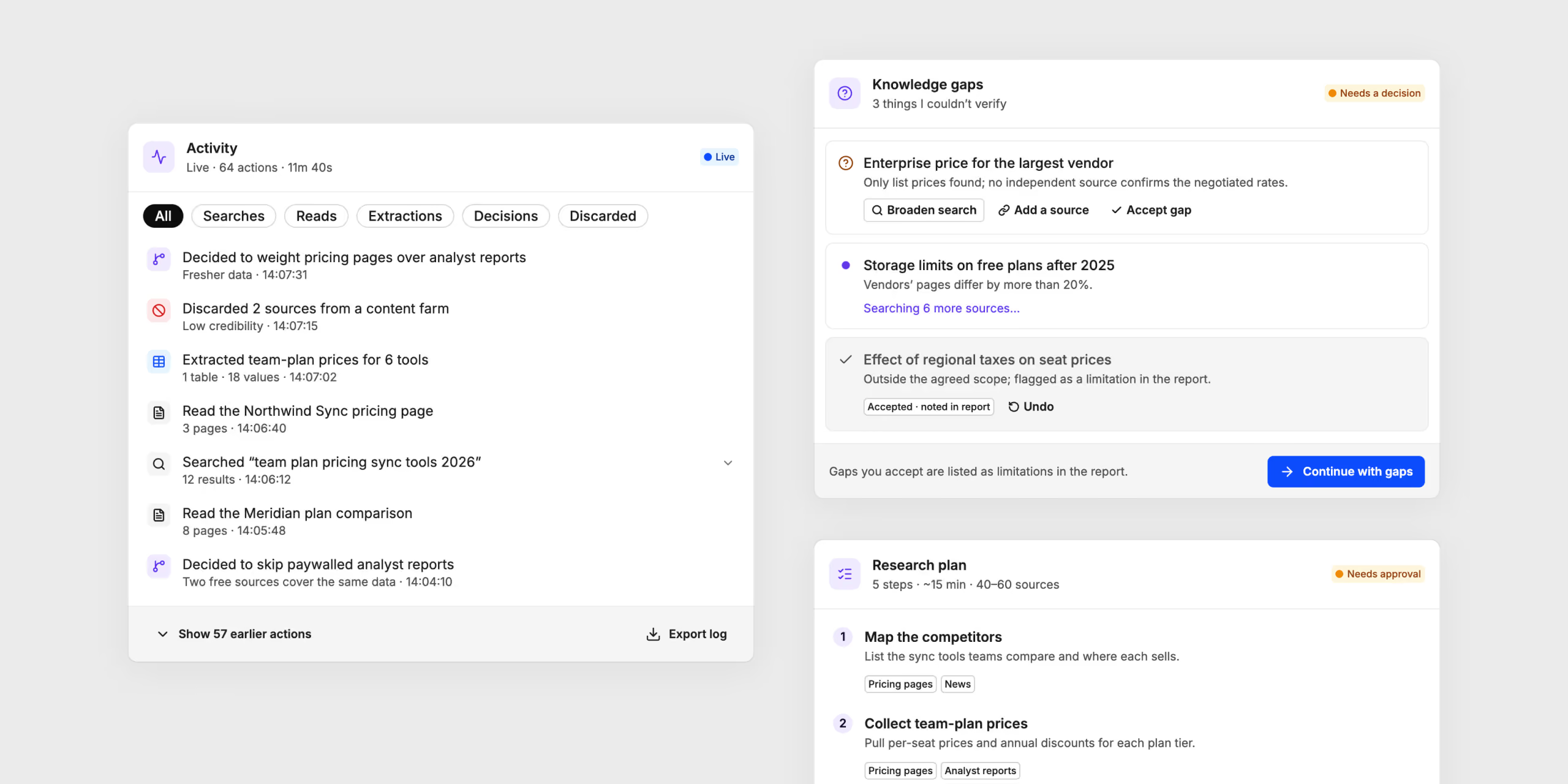
Anvil has four levels. Atoms are single elements, like a button or a badge. Molecules put few atoms together for one job. Organisms are full sections, a dialog or a table. On top of them sits the Agent Builder, with ready-to-use agent experiences in 16 groups, built only from the levels below.

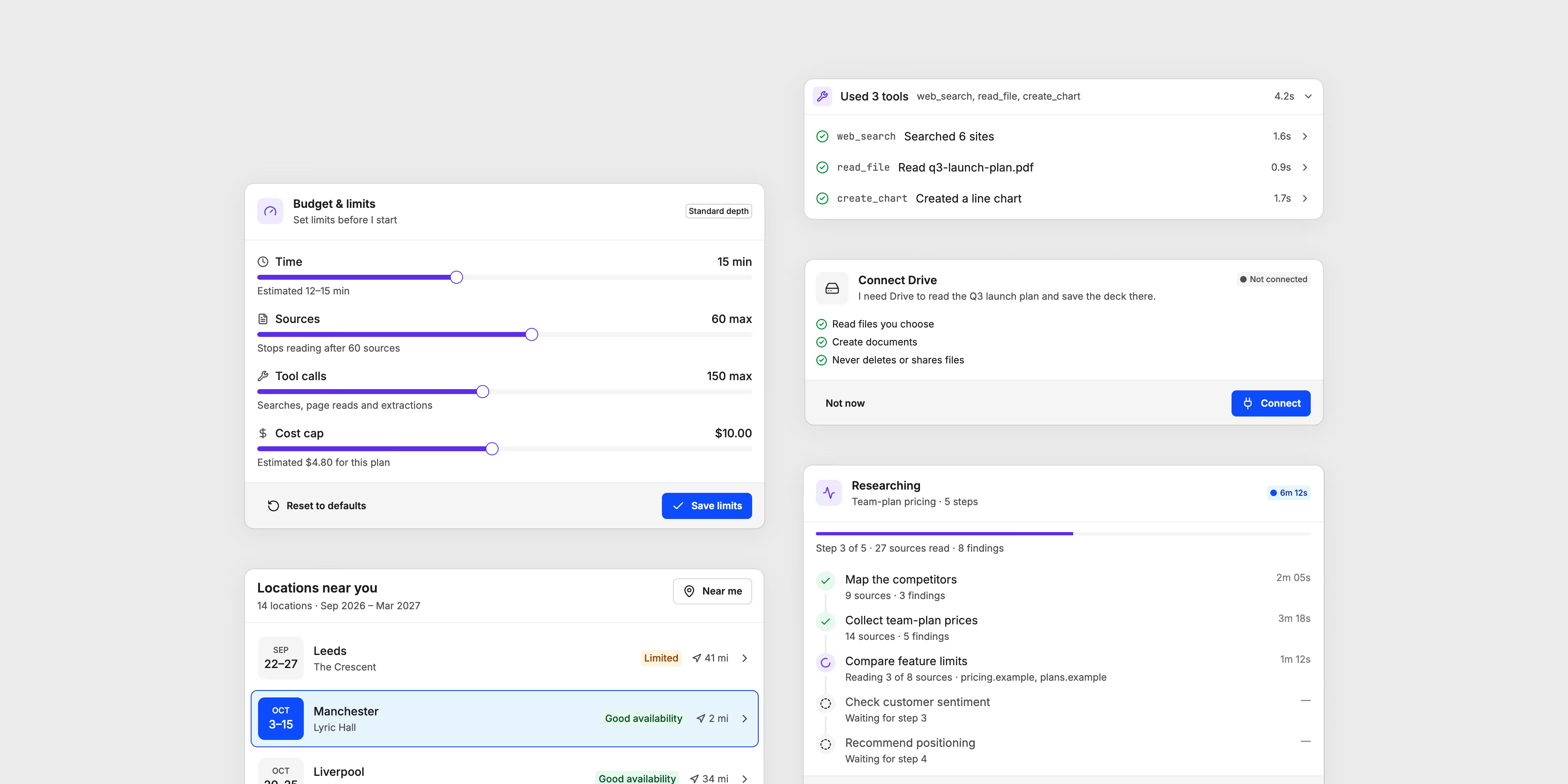
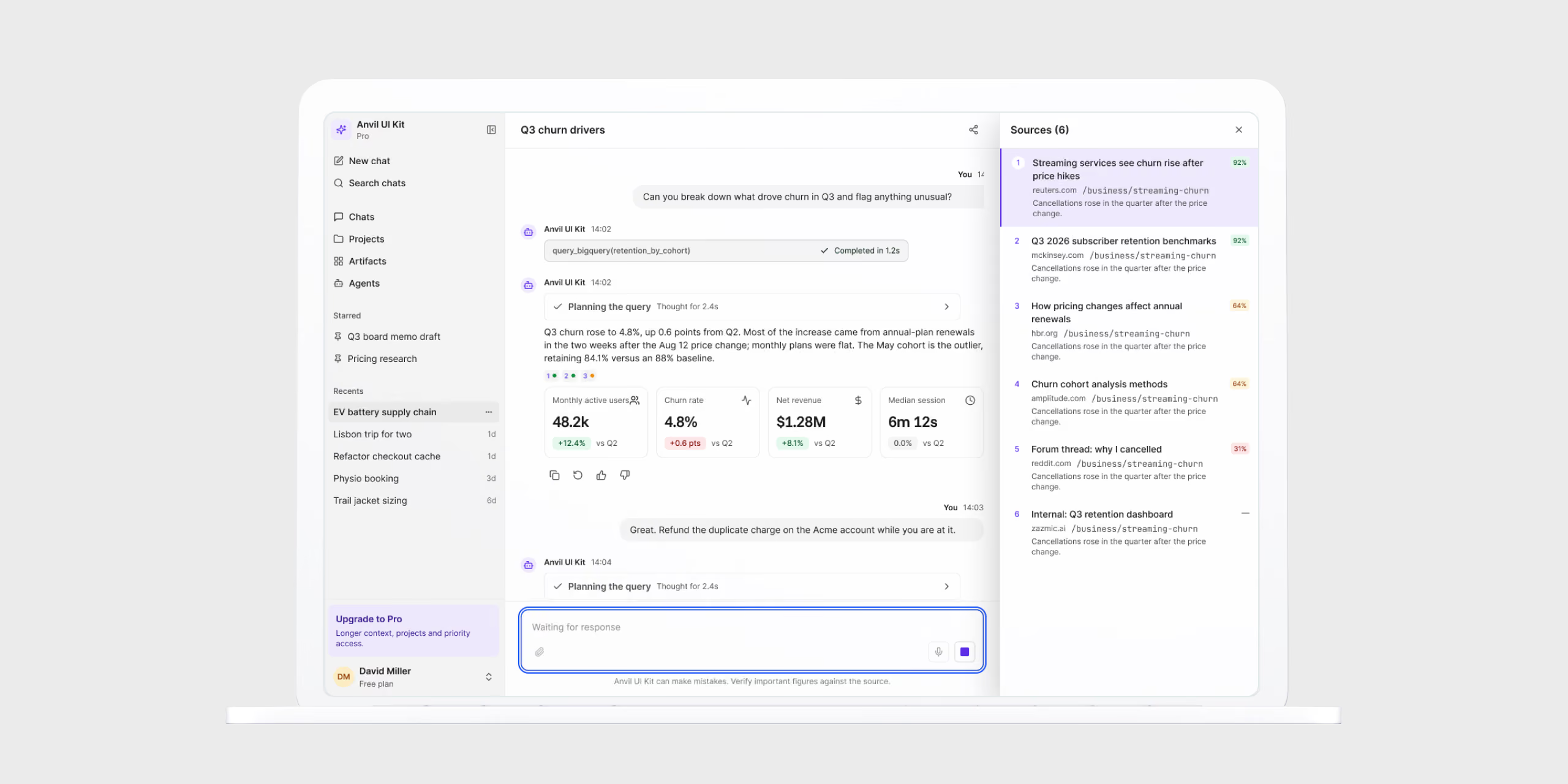
Most of my design time went into the agent layer. Here are some of problems it solves.
- Showing work that is normally invisible. A thinking panel and a tool-call log tell you what the agent is doing, without burying the answer.
- Trust. Citation chips, source cards and a confidence indicator show where the answer comes from and how sure the agent is about it.
- Control. Approval cards, clarifying questions and quick replies make the agent ask first and act after.
- Long tasks. Task plans and a progress timeline let people pause, resume or stop the work.
- Memory. You can see what the agent remembers about you, and change it.
- Answers that aren’t text, like offer carousels, an availability calendar or file cards, right inside the conversation.
The same components work in full screen, in a side panel, in a popover and on mobile.
Figma first, then a contract, then code
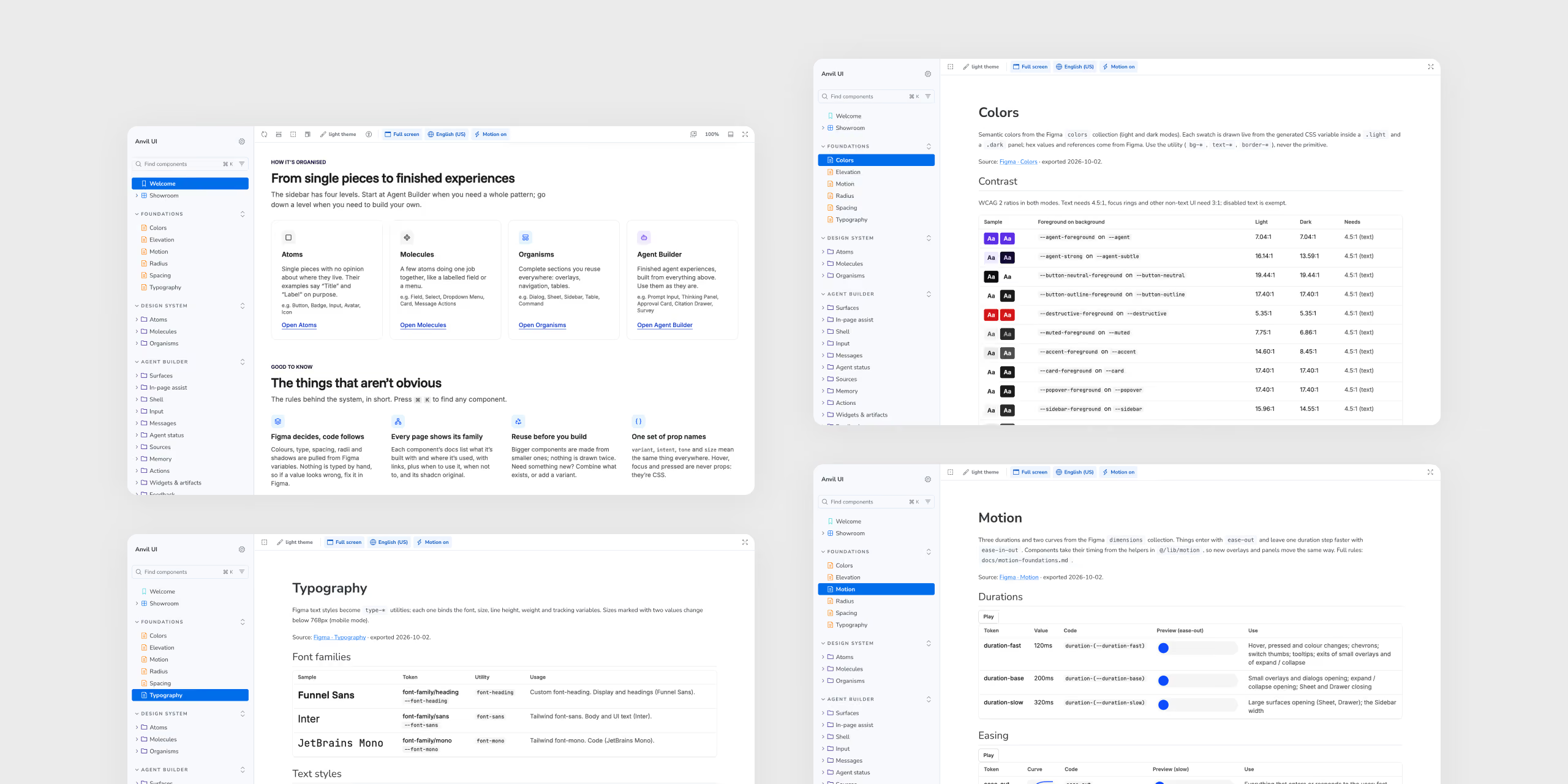
Figma is the source of truth for design. About 340 tokens (colours, type, spacing, elevation, motion) go from Figma variables to code through a script. Nobody types them by hand, and the build fails if code and Figma don’t match. I also switched off Tailwind’s default palette, so everything you see on screen comes from a token. You can’t just write bg-red-500 and hope for the best.
For naming I wrote an API contract. There are four props, variant, intent, tone and size, and they work the same on every component, so you learn them once. The state property from Figma never becomes a prop. Hover, focus and disabled live in CSS, so there is no way to pass the wrong one.
Under the styling I used shadcn/ui and Radix. Keyboard support, focus and dismissing come from libraries which already do it well. Whenever I changed their behaviour on purpose, I wrote down the reason.
Documentation people actually read
I treated Storybook as product. Every component page has live controls, a link to the Figma frame, a usage guide (when to use it, when not, and what to use instead) and a table that maps every Figma property to what it becomes in code.
From molecules up, stories don’t use lorem ipsum. They all share one made-up company, one assistant and one project. Reviewers then look at it like at a real product, and less like a gallery of parts.
The Showroom
A list of components doesn’t tell you much how an agent feels to use. That’s why Storybook opens with the Showroom, the features demo. It’s a scripted assistant made only from real Anvil components. You can switch between desktop and mobile, light and dark, full screen, side panel or popover, and go through four flows. You can research a task, order a product, book a show or talk to a person.
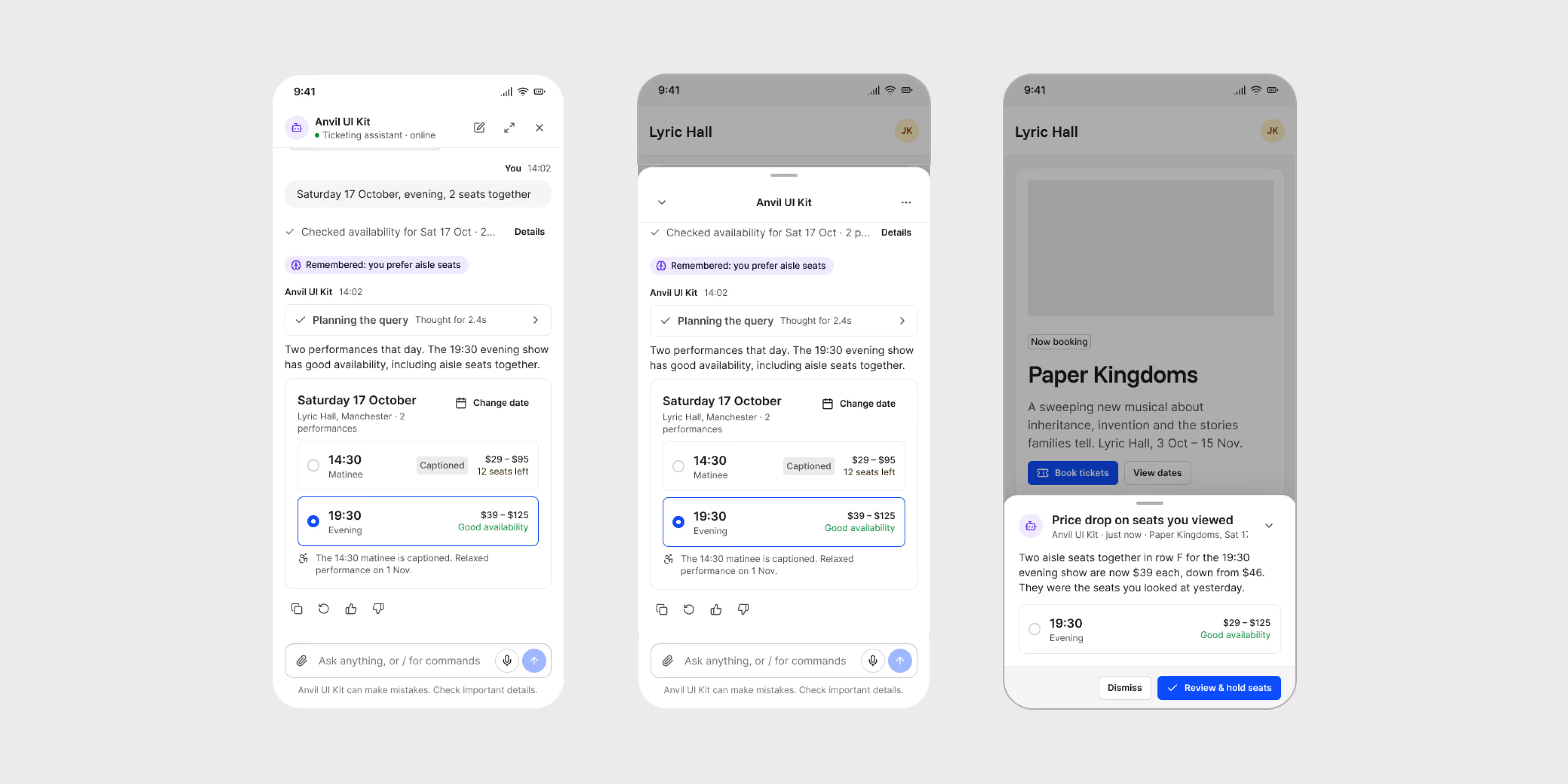
It’s scripted on purpose, so it can’t go off script while someone is clicking through it. It still shows loading, error and queued states, the same as real agent goes through. I also hid around 50 small talk replies and easter eggs inside, like a coin flip or a round of rock, paper, scissors. Without them the demo felt a bit dead, and the jokes are what keeps people clicking.
Working with an AI agent, on my terms
I built Anvil together with an AI coding agent, and it did a lot of the typing. What got built, how good it had to be, in which order and what went live was my decision. To make that more than a promise, I put a system around it.
- I set the rules. A project guide fixes the stack, naming and workflow, and lists things the agent has to ask me about first, like adding a dependency, renaming a public prop or changing folder structure.
- The agent builds on a branch, one component or group per pull request, and checks what already exists before it makes anything new.
- It checks its own work with types, lint, tests, and a look in a real browser with measurements.
- It opens a pull request and waits. It never merges by itself.
- Required checks run for types, lint, tokens being up to date, Storybook tests in light and dark, and a Storybook build. When any of them fails, work goes back to the agent.
- I look at the real result and approve every merge. Then the live Storybook updates.
Many of the rules fail loudly, so nobody has to remember them. Lint checks component levels (an atom can’t import an organism), motion, right-to-left-safe CSS and accessibility. Axe runs on every story in both themes, and screenshot tests catch changes nobody meant to make.
Not everything went smooth. Once a pull request got merged before I said so. We talked it through and the rule became explicit, so merges happen only when I say. I’m including it here because the setup made the mistake easy to spot and easy to fix.
Key Takeaways
Before this project I thought working with AI agent was mostly about writing good prompts. Writing the rules once and letting the tooling enforce them worked much better than any instruction I gave per task.
I also stopped trusting my first layout instinct. I measure now, and then I look again. Sometimes the numbers say yes and my eyes say no, and I go with my eyes.
What I want next is more of this kind of work, building AI products where a designer sets the bar and the tools bring the speed.